Technology moves fast! ⚡ Don't get left behind.🚶 Subscribe to our mailing list to keep up with latest and greatest in open source projects! 🏆
hexo-theme-next
Elegant theme for Hexo.

 (2 ratings)

Statistics on hexo-theme-next
| Number of watchers on Github | 11280 |
| Number of open issues | 73 |
| Average time to close an issue | 4 days |
| Main language | CSS |
| Average time to merge a PR | 3 days |
| Open pull requests | 52+ |
| Closed pull requests | 67+ |
| Last commit | over 1 year ago |
| Repo Created | over 4 years ago |
| Repo Last Updated | over 1 year ago |
| Size | 13 MB |
| Homepage | http://notes.iiss... |
| Organization / Author | iissnan |
| Latest Release | v5.1.4 |
| Contributors | 45 |
| Page Updated | 2018-03-12 |
| Do you use hexo-theme-next? Leave a review! | |
| View open issues (73) | |
| View hexo-theme-next activity | |
| View on github | |
| Fresh, new opensource launches 🚀🚀🚀 | |
|
Trendy new open source projects in your inbox!
View examples
|
|
NexT v6.0.0 here :triangular_flag_on_post:
NexT
NexT is a high quality elegant Hexo theme. It is crafted from scratch, with love.


Live Preview
- :heart_decoration: Muse scheme: LEAFERx | XiaMo | OAwan
- :six_pointed_star: Mist scheme: Jeff | uchuhimo | xirong
- :pisces: Pisces scheme: Vi | Acris | Rainy
- :gemini: Gemini scheme: Ivan.Nginx | Alynx | Raincal
More NexT examples here.
Installation
1. Change dir to hexo root directory. There must be node_modules, source, themes and other directories:
   $ cd hexo
   $ ls
   _config.yml  node_modules  package.json  public  scaffolds  source  themes
2. Get theme from GitHub. There are several variants to do it:
Download latest release version.
At most cases stable. Recommended for most users.

   $ mkdir themes/next
   $ curl -s https://api.github.com/repos/iissnan/hexo-theme-next/releases/latest | grep tarball_url | cut -d '"' -f 4 | wget -i - -O- | tar -zx -C themes/next --strip-components=1
Download tagged release version.
You must define version. Replace v5.1.2 with any version from tags list.

   $ mkdir themes/next
   $ curl -L https://api.github.com/repos/iissnan/hexo-theme-next/tarball/v5.1.2 | tar -zxv -C themes/next --strip-components=1

$ git clone --branch v5.1.2 https://github.com/iissnan/hexo-theme-next themes/next
Download latest master branch.
May be unstable, but includes latest features. Recommended for developers.
   $ mkdir themes/next
   $ curl -L https://api.github.com/repos/iissnan/hexo-theme-next/tarball | tar -zxv -C themes/next --strip-components=1
$ git clone https://github.com/iissnan/hexo-theme-next themes/next
Clone command will give you the whole repository. And in any time you can switch to any tagged release.\ Get tags list:
   $ cd themes/next
   $ git tag -l

   v5.0.0
   v5.0.1
   v5.1.0
   v5.1.1
   v5.1.2
For example, you want to switch on v5.1.0 tagged release version. Input the following command:
   $ git checkout tags/v5.1.0
   Note: checking out 'tags/v5.1.0'.

   HEAD now on 1f72f68... CSS: Remove global list-style setting of ul
And if you want to switch back on master branch, input this command:
$ git checkout master
3. Set theme in main hexo root config _config.yml file:
theme: next
Bugs
For those who also encounter Error: Cannot find module 'hexo-util' issue, please check your NPM version.
-
> 3: Still not work. Please removenode_modulesdirectory and reinstall usingnpm install. -
< 3: Please addhexo-utilexplicitly vianpm install --save-dev hexo-utilto you site package deps.
Update
$ cd themes/next
$ git pull
Bugs
Commit your changes or stash them before you can merge
You must Commit, Stash or Discard local changes. See here how to do it.
Theme configurations using Hexo data files (#328)
Currently, it is not smooth to update NexT theme from pulling or downloading new releases. It is quite often running into conflict status when updating NexT theme via git pull, or need to merge configurations manually when upgrading to new releases.
At present, NexT encourages users to store some options in site's _config.yml and other options in theme's _config.yml. This approach is applicable, but has some drawbacks:
- Configurations are splited into two pieces
- Users maybe confuse which place should be for options
In order to resolve this issue, NexT will take advantage of Hexo Data files. Because Data files is introduced in Hexo 3, so you need upgrade Hexo to 3.0 (or above) to use this feature.
If you prefer Hexo 2.x, you can still use the old approach for configurations. NexT is still compatible with Hexo 2.x.
Benefits
With this feature, now you can put all your configurations into one place (source/_data/next.yml), you don't need to touch next/_config.yml. If there are any new options in new releases, you just need to copy those options from next/_config.yml, paste into _data/next.yml and set their values to whatever you want.
How to use this feature
- Please ensure you are using Hexo 3 (or above)
- Create an file named
next.ymlin site'ssource/_datadirectory (create_datadirectory if it did not exist) - Copy NexT theme options both in site's
_config.ymland theme's_config.ymlintonext.yml. - Use
--config source/_data/next.ymlparameter to start server, generate or deploy.\ For example:hexo clean --config source/_data/next.yml && hexo g --config source/_data/next.yml.
Features
Multiple languages support, including:
:cn: Simplified Chinese & Traditional Chinese.
:us: English
:ru: Russian
:fr: French
:de: German
:jp: Japanese
:indonesia: Indonesian
:portugal: Portuguese (Brazil)
:kr: Korean
:it: Italian
:netherlands: Dutch
:vietnam: Vietnamese
Default language is English.
language: en
# language: zh-Hans
# language: zh-hk
# language: zh-tw
# language: ru
# language: fr-FR
# language: de
# language: ja
# language: id
# language: pt
# language: pt-BR
# language: ko
# language: it
# language: nl-NL
# language: vi
Set language field as following in site _config.yml to change to Chinese.
language: zh-Hans
Comment support.
NexT has native support for DuoShuo and Disqus comment systems.
Add the following snippets to your _config.yml:
duoshuo:
  enable: true
  shortname: your-duoshuo-shortname
OR
disqus_shortname: your-disqus-shortname
Tags page.
Add a tags page contains all tags in your site.
-
Create a page named
tagshexo new page "tags" -
Edit tags page, set page type to
tags.title: All tags date: 2014-12-22 12:39:04 type: "tags" -
Add
tagsto theme_config.yml:menu: home: / archives: /archives tags: /tags
Categories page.
Add a categories page contains all categories in your site.
-
Create a page named
categorieshexo new page "categories" -
Edit categories page, set page type to
categories.title: All categories date: 2014-12-22 12:39:04 type: "categories" -
Add
categoriesto theme_config.yml:menu: home: / archives: /archives categories: /categories
Social Media
NexT can automatically add links to your Social Media accounts:
social:
  GitHub: your-github-url
  Twitter: your-twitter-url
  Weibo: your-weibo-url
  DouBan: your-douban-url
  ZhiHu: your-zhihu-url
Feed link.
Show a feed link.
Set rss field in theme's _config.yml, as the following value:
-
rss: falsewill totally disable feed link. -
rss:use sites' feed link. This is the default option.Follow the installation instruction in the plugin's README. After the configuration is done for this plugin, the feed link is ready too.
rss: http://your-feed-urlset specific feed link.
Up to 5 code highlight themes built-in.
NexT uses Tomorrow Theme with 5 themes for you to choose from.
Next use normal by default. Have a preview about normal and night:
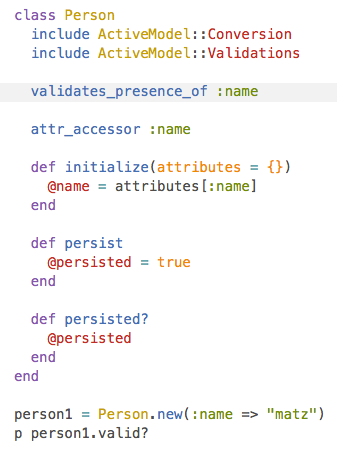
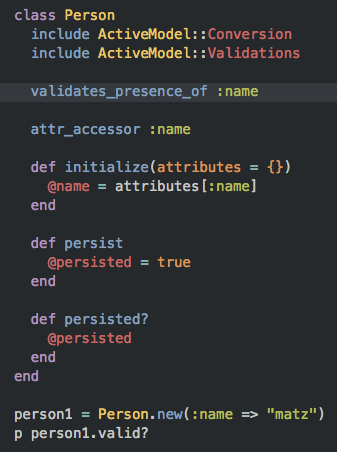
Head over to Tomorrow Theme for more details.
Configuration
NexT comes with few configurations.
# Menu configuration.
menu:
  home: /
  archives: /archives

# Favicon
favicon: /favicon.ico

# Avatar (put the image into next/source/images/)
# can be any image format supported by web browsers (JPEG,PNG,GIF,SVG,..)
avatar: /default_avatar.png

# Code highlight theme
# available: normal | night | night eighties | night blue | night bright
highlight_theme: normal

# Fancybox for image gallery
fancybox: true

# Specify the date when the site was setup
since: 2013
Browser support


BrowserStack is a cloud-based cross-browser testing tool that enables developers to test their websites across various browsers on different operating systems and mobile devices, without requiring users to install virtual machines, devices or emulators.
Contributing
Contribution is welcome, feel free to open an issue and fork. Waiting for your pull request.
- over 2 years 建议:修改侧边栏标签和分类链接的显示逻辑。
- over 2 years deploy后github 仓库老是生成不存在的文件夹,见鬼了~~~
- over 2 years 代码高亮宏无效
- over 2 years _custom/custom.styl文件出现问题
- over 2 years 一样一样的
- over 2 years local-search挂掉了,看调试是括号不匹配
- over 2 years cloudapp图床私密链接无法显示,普通链接可以显示
- over 2 years Next主题,hexo d上传github pages,页面变成空白
- over 2 years 使用next出现问题
- over 2 years 侧边栏的文章目录有问题
- over 2 years 有可供选择的markdown渲染主题吗?
- over 2 years 关于最近部署后空白的问题,请问怎么更新next主题呢?
- over 2 years 不能在无序列表内嵌套有序列表
- over 2 years 目前似乎不支持Hexo3
- over 2 years MarkDown 搭配 html 会产生宽的分隔符
- over 2 years 菜单项的 首页 分类 留言 标签点击都不起作用
- over 2 years 可以加入 汉字标准格式 支持吗
- over 2 years 有关博客传到github css js 404的问题 解决方案!!!
- over 2 years hexo s可以正常浏览,hexo d发布之后,网页一片空白,只有底部的页码能看到。
- over 2 years 想着在每篇博客结尾加一个本篇博客地址
- over 2 years 挂载在域名子目录 下的博客,搜索结果路径问题
- over 2 years 文章页标题的问题
- over 2 years hexo s --debug 开启服务报错:no such file or directory, open hexo/themes/hexo-theme-next-5.0.1/layout/_scripts/schemes/.swig'
- over 2 years post 内文章转换后非 HTML文件,无文件类型, `hexo g -d` 正常
- over 2 years 我想让右下角的菜单按钮在移动端生效,应该怎么解决?
- over 2 years 如果打开主页时宽度小于991px,那么拉伸到991px+,菜单栏也不会出现
- over 2 years 多说评论框的宽度极限与页面的适配问题(请见图中标注)
- over 2 years tags页面打不开
- over 2 years 建议增加主题版本更新方案
- over 2 years 多说评论框重叠
- update siderbar subtitle
- new feature: local search
- Fix invisible list style #559
- bugfix: mobile screen adapt
- Pisces文章目录跟随屏幕滚动
- Pisces 修改 css 头像外框改成圆形,并且可以旋转
- change avatar to circular form and can rotate 360°
- Pisces站点首页评论数不显示 #475
- 增加切换手机端导航栏的功能
- 修复需要配置两次discus_shortname的问题
- Xirong
- minor bug in JS code
- Fixing word breaking on post body for mobile devices.
- Pull request isudox
- fix sidebar position
- 配置文件新增对社交链接的配置建议
- Update baidu-push.swig
- add Simplified/Traditional Chinese language swich
- 修改如下:
- Update fb comments plugin
- Add languages/ko.yml (korean version)
- Update cnzz-analytics.swig
- improvement of localsearch
- Fixes in CSS styles of code blocks.
- For support diff highlight style
- corrected disqus example in readme
- Update add-this.swig, fix a not-shown problem
- Fixes and improvements.
- Show overview widget by default at the side bar when user is reading an
- Feature page study
- add duoshuo-recent-visitors
- Update _config.yml
- Update post-meta.styl
- add config for diy icon between year and author @footer place
- bugfix -- Pisces scheme sidebar positioning error
- 添加了新特性:支持设置各页面与每篇博文的封面
- Small Enhancements.
- Feature: Add Gitment Support
- Master
- fix: fix the subtitle and site-nav-toggle are overlapping on the mobile case
- Add bootstrap label alert
- Copyright session
- 更新next主题。
- E2E Testing Setup (WIP).
- Feature: Added Gitalk support.
- fix layout beautiful when browser changes size !
- adjust sidebar hide time in Next.Mist
- Update to fancyBox 3.2.0
- Add building time
- Exclude img in link from fancybox
- Feature: Add Gitalk Support
- Fix Click the image as hyperlink doesn't jump
v5.1.4 v5.1.4
Updates
- UPD: Valine comment system version & configuration (#1934, #1959, #1983, #1994)
- UPD: Translate from English docs to Chinese docs. (#1995, #1996)
Features
- ADD: NeedMoreShare2 (#1913)
- ADD: Gitment supported with mint (#1919)
- ADD: Dutch translation (#1961)
- ADD: Firestore visitor counter (#1978, #1984)
- ADD: Vietnamese Language (#2011)
Bugs
- FIX: sidebar asymmetry in Pisces | Gemini schemes. (52710a576deaa46e3c951538598682560a42637b)
- FIX: canvas-ribbon error. (#1932)
- FIX: canvas_ribbon can't display normally (#1936)
- FIX: issues #1942 (#1945), #1946 (#1967), #1923 (#1988), #2033 (#2040), #2039 (#2043)
- FIX: bug of gitment (#1944)
For full changes, see the comparison between 5.1.3 and 5.1.4
v5.1.3 v5.1.3
HOTFIXES
Need to update it manually!
- FIX: sidebar blinking at the left in Pisces | Gemini schemes. 81905b960cd943ebe79321feac37bacd84fdacda
Breaking changes
In NexT _config.yml:
Favicon
Old configuration:
-# Put your favicon.ico into `hexo-site/source/` directory.
-favicon: /favicon.ico
New configuration:
# To get favicons visit: https://realfavicongenerator.net
# Put your favicons into `hexo-site/source/` or `hexo-site/themes/next/source/images/` directory.
# Default NexT favicons placed in `hexo-site/themes/next/source/images/` directory.
# And if you want to place your icons in `hexo-site/source/`, you must remove `/images` prefix from pathes.
favicon:
  small: /images/favicon-16x16.png
  medium: /images/favicon-32x32.png
  apple_touch_icon: /images/apple-touch-icon.png
  safari_pinned_tab: /images/logo.svg
  #android_manifest: /images/manifest.json
  #ms_browserconfig: /images/browserconfig.xml
Motion
Old configuration:
-# Motion
-use_motion: true
New configuration:
# Use velocity to animate everything.
motion:
  enable: true
  async: false
  transition:
    # Transition variants:
    # fadeIn | fadeOut | flipXIn | flipXOut | flipYIn | flipYOut | flipBounceXIn | flipBounceXOut | flipBounceYIn | flipBounceYOut
    # swoopIn | swoopOut | whirlIn | whirlOut | shrinkIn | shrinkOut | expandIn | expandOut
    # bounceIn | bounceOut | bounceUpIn | bounceUpOut | bounceDownIn | bounceDownOut | bounceLeftIn | bounceLeftOut | bounceRightIn | bounceRightOut
    # slideUpIn | slideUpOut | slideDownIn | slideDownOut | slideLeftIn | slideLeftOut | slideRightIn | slideRightOut
    # slideUpBigIn | slideUpBigOut | slideDownBigIn | slideDownBigOut | slideLeftBigIn | slideLeftBigOut | slideRightBigIn | slideRightBigOut
    # perspectiveUpIn | perspectiveUpOut | perspectiveDownIn | perspectiveDownOut | perspectiveLeftIn | perspectiveLeftOut | perspectiveRightIn | perspectiveRightOut
    post_block: fadeIn
    post_header: slideDownIn
    post_body: slideDownIn
    coll_header: slideLeftIn
    # Only for Pisces | Gemini.
    sidebar: slideUpIn
Sidebar
Removed offset_float option:
  # Sidebar offset from top menubar in pixels (only for Pisces | Gemini).
  offset: 12
- offset_float: 12
Menu & Sidebar icons
# When running the site in a subdirectory (e.g. domain.tld/blog), remove the leading slash from link value (/archives -> archives).
# Usage: `Key: /link/ || icon`
# Key is the name of menu item. If translate for this menu will find in languages - this translate will be loaded; if not - Key name will be used. Key is case-senstive.
# Value before `||` delimeter is the target link.
# Value after `||` delimeter is the name of FontAwesome icon. If icon (with or without delimeter) is not specified, question icon will be loaded.
menu:
-  home: /
-  #categories: /categories/
-  #about: /about/
-  #archives: /archives/
-  #tags: /tags/
-  #sitemap: /sitemap.xml
-  #commonweal: /404/
+  home: / || home
+  #about: /about/ || user
+  #tags: /tags/ || tags
+  #categories: /categories/ || th
+  #archives: /archives/ || archive
+  #schedule: /schedule/ || calendar
+  #sitemap: /sitemap.xml || sitemap
+  #commonweal: /404/ || heartbeat

# Enable/Disable menu icons.
menu_icons:
  enable: true
- #KeyMapsToMenuItemKey: NameOfTheIconFromFontAwesome
-  home: home
-  about: user
-  categories: th
-  schedule: calendar
-  tags: tags
-  archives: archive
-  sitemap: sitemap
-  commonweal: heartbeat

# Social Links.
# Usage: `Key: permalink || icon`
# Key is the link label showing to end users.
# Value before `||` delimeter is the target permalink.
# Value after `||` delimeter is the name of FontAwesome icon. If icon (with or without delimeter) is not specified, globe icon will be loaded.
#social:
-  #LinkLabel: Link
+  #GitHub: https://github.com/yourname || github
+  #E-Mail: mailto:[email protected] || envelope
+  #Google: https://plus.google.com/yourname || google
+  #Twitter: https://twitter.com/yourname || twitter
+  #FB Page: https://www.facebook.com/yourname || facebook
+  #VK Group: https://vk.com/yourname || vk
+  #StackOverflow: https://stackoverflow.com/yourname || stack-overflow
+  #YouTube: https://youtube.com/yourname || youtube
+  #Instagram: https://instagram.com/yourname || instagram
+  #Skype: skype:yourname?call|chat || skype

social_icons:
  enable: true
  icons_only: false
  transition: false
-  # Icon Mappings.
-  # KeyMapsToSocialItemKey: NameOfTheIconFromFontAwesome
-  GitHub: github
-  E-Mail: envelope
-  Google: google
-  Twitter: twitter
-  FB Page: facebook
-  VK Group: vk
-  Skype: skype
-  YouTube: youtube
-  Instagram: instagram
-  StackOverflow: stack-overflow
-  Weibo: weibo
Footer
Old configuration:
-# Specify the date when the site was setup
-#since: 2015

-# icon between year and author @Footer
-authoricon: heart

-# Footer `powered-by` and `theme-info` copyright
-copyright: true
New configuration:
footer:
  # Specify the date when the site was setup.
  # If not defined, current year will be used.
  #since: 2015

  # Icon between year and copyright info.
  icon: user

  # If not defined, will be used `author` from Hexo main config.
  copyright:
  # -------------------------------------------------------------
  # Hexo link (Powered by Hexo).
  powered: true

  theme:
    # Theme & scheme info link (Theme - NexT.scheme).
    enable: true
    # Version info of NexT after scheme info (vX.X.X).
    version: true
  # -------------------------------------------------------------
  # Any custom text can be defined here.
  #custom_text: Hosted by <a target="_blank" href="https://pages.github.com">GitHub Pages</a>
Updates
- UPD: ISSUE_TEMPLATE.md
- UPD: PULL_REQUEST_TEMPLATE.md
- UPD:
.travis.yml: ignore*.mdfiles and docs directory. (3602b927cb04a0fe9862dad7b13f496cec98906d) - UPD: Switch CN <-> EN readme's & Global refactor and update README.md.
Features
- ADD:
<kbd>tag style. (10f5c496c6f06ac0ee5190a428277f46d5e290e8) - ADD: Valine comment system support (#1811)
- ADD:
post_wordcount.totalcountoption. (#1812) - ADD: no need to add translate to menu anymore. (91eb2d272500993ccad1d15968a1beff9aaf3f03)
- ADD: theme version in frontend config. (f36f00c482a315e73fb80b121f62a048bc415e4d)
- ADD: Bing verification (c61386deaa17e4a435ef9226f27b959033fabb83)
- ADD:
motiontransitionvariants. (#1829) - ADD: Menu & Sidebar icons in 1 line with Keys and Values of this icons. (#1830)
- ADD: Donate internationalization (#1847)
- ADD: Allow the user to override the whole configuration (#1861)
- ADD: Italian translation (#1863)
- ADD: Improve font configurations for global and headings (#1879) & Fix Mist font-size for Posts on mobile (#1880) & Fix font-size only for mobile (#1891)
- ADD: Options to better control footer. (#1886)
- ADD: scrolling to active TOC if TOC > viewport. (619c49e)
- ADD: Responsive favicons options. (#1898, PART 4)
- ADD: Post custom copyright feature. (#1898, PART 5)
Bugs
- FIX: remove clearfix hack > conflict with flex. (83c2b84ed4a312a63bf102842ff9ee6ae30b45a2)
- FIX: Upgrade jiathis share thirdparty plugin code template. (#1796)
- FIX: blogroll max-width & links_layout. (#1808)
- FIX:
post_wordcount.separated_metaoption. (#1812) - FIX: sitebar right position width incorrect. (7caab488a5fbf687e055c87fdd2b7e7cd10588ef)
- FIX: hide archive sidebar item when no posts. (7eb5a97f9ef1d9c8738e387e17a2221a5cb0ebb4)
- FIX: class style was break within space-name. (9f245fa8aa5150f294177b5e41d296854028f2ac)
- FIX: archive link not worked if no archive menu. (074bd04fcefc75ddc5df094abe906cb5eb32b443)
- FIX: Refactor
page_class& fix sidebar affix on archives page. (#1825) - FIX: sidebar affix global fix. (#1829) & FIX: to #1829 global affix fix. (edd1ff0fd8eb084f0d9438c47481c21a69aabe6e)
- FIX: remove Firefox's dotted borders on links. (9e9b5b4731cb0a4523aedf24539ca3e0ae130b74)
- FIX: commented
avatarnot visible in sidebar for now.. (#1837) - FIX: link to archives with icons was't work. (ba842f52bf783bdce37ede0dc5f7c8c29c52e48f)
- FIX: tencent weibo typo #1833 (#1845)
- FIX: move
flexstyle from global sidebar style to Pisces and Gemini schemes only. (#1846) - FIX: excess spaces in sidebar author links. (edad5e331f0f145690015d30cead635f337bac4f)
- FIX:
han.woff2404 not found. (000cd69d994ab3cba27f26926fbd895fd711797a) - FIX: Donate Button Style (#1847)
- FIX: language space typo (#1850)
- FIX: fancybox style (#1862) & caption position (#1864)
- FIX: Remove line-height declaration (#1881) & Fix to #1881. (1f85ef8c042b7da476f4a9dc525ac0493329761f)
- FIX: caution for Safari bug in
fontsettings & disabledfontoption by default. (e5c0956c476f08ba184ba5d006051d38db116a6f) - FIX: sidebar with motion on Mist & Muse schemes. (9ce276f)
- FIX: tabbed code block padding style. (beb52f8, d433afd)
- FIX: site state items padding for Pisces & Gemini. (b9243d9)
- FIX: comments block only show if comments present. d8543f8 abb1424
- FIX: Sidebar scrollable in all schemes. (#1898, PART 2)
- FIX: Enhancements for Gemini scheme. (#1898, PART 3)
- FIX: tags amount from 200 to 300 (temporaily solution). (de271c1785166d1713fe4f89afffd853c43cc03d)
For full changes, see the comparison between 5.1.2 and 5.1.3
v5.1.2 v5.1.2
Breaking changes
-
Gentie service is not support anymore: #1745.
diff
-gentie_productKey:
Updates
- UPD: RU language. #1574
- UPD:
tencent-mtato 2.0.4 and using https #1658 - UPD: Algolia logo #1669
- UPD: Removing gentie service. #1745
- UPD: FB version. 571051df278c9f92dfaf381ba5b9d3c4c8362fe3
- UPD: ISSUE_TEMPLATE.md 10e682bf763b0cf945f7d4161b1426e9393c4ae1
- UPD: PULL_REQUEST_TEMPLATE.md 0b937e9e9dbc247075174c420f741abf5621d516
- UPD: README.en.md 1fbafafeb30569c2cf8c79510f36619564a5b765
- UPD: <p> tag for better vertical screen economy.
- UPD:
offset_floatdefault to 12 px.
Features
- ADD: subtitle to index (
index_with_subtitleoption). #1522 - ADD:
canvas-ribbon(Pisces only). #1565 - ADD:
save_scrolloption. #1574 - ADD: canvas ribbon vendor script e4457ab4e95e8600080e1bcc0ee977e72e78d7d5
- ADD: in
canvas_linesandcanvas_sphereto background animation. #1595 - ADD: Han Support (issues > #1558 / #1222 / #698) #1598
- ADD: several improvements to local search #1612
- ADD: 2 improvements to local search #1618
- ADD: loading animation when search data is loading #1633
- ADD: json search engine support #1635
- ADD: TOC to pages. #1649
- ADD: Sidebar affix on all pages. #1649
- ADD: Option for
separated_metain post-wordcount. #1649 - ADD: Option for placed new words in new line in TOC. #1649
- ADD: Lazy load images (beta). #1649
- ADD: Star
ratingsupport. #1649 - ADD: Implement the load bar at the top of the page #1689
- ADD: Android Chrome Color. #1697
- ADD: Add note tag
modernstyle,flatstyle & refactor note basic style. #1697 - ADD: Add
social icons_only&transition option. #1697 - ADD: Add
RTLlanguages support for posts & pages. #1697 - ADD: Refactor
wechat,rewardand copyright features & addedbitcoindonate. #1697 - ADD: Add
mobile_layout_economyoption. #1697 - ADD: Add
tabstag. #1697 - ADD: Add
labeltag. #1697 - ADD: Add
Geminischeme. #1697 - ADD: enable sidebar on mobile (
onmobileoption) #1717 - ADD: Little trick enabling sidebar closing through swiping #1757
- ADD: post-body class to pages & refactor vision. 4d839733903856984c9f7f44916a7e119aa45b4b
- ADD: mobile extended resolutions. 17bbe1638d87b32fd0c12497d7d255a563997d5d
- ADD: transition variants. 3a8bd56ef04bb17bcef3f13c4abcb569d13172ba
Bugs
- FIX: footer layout. #1546
- FIX: Ajust code block display in mobile for better UX #1526
- FIX:
scroll_percentnow count only content div. #1574 - FIX:
utils.jserror #1585 - FIX: disable canvas ribbon by default f1491a32b261a1aaea404e659b3a4bf11dc6e0d6
- FIX: #1589
three_wavesbug #1593 - FIX: codeblock overflows screen when width <= 767px #1596
- FIX: LiveRe's loading conditions fail due to breaking changes of Disqus settings #1597
- FIX: Han post switch option. #1607
- FIX: Right space in switch block. e326306e62212d6feedcf8312372e67fd0ae977c
- FIX: post-wordcount information on the same line with other #1613
- FIX: invalid math of
scroll_percent. #1615 3bfb633119bb7f7d8020b6060eafb2fb5a15db26 - FIX: clean search input and result when pressing Esc key #1621
- FIX: titles & headers excess spaces. #1632
- FIX:
canvas-ribboncause scroll not working #1640 - FIX: improve ribbon performance (touch device) #1641
- FIX: W3 validator error 9fe2637cb1fbb38cc994de7548d3d3e41a36c7f5
- FIX: tags & categories H1 left margin. #1649
- FIX: move third-party analyitcs to <head> #1705
- FIX: localsearch compatible with old browser #1709
- FIX: using bootcss cdn instead of
mathjaxofficial one because the official cdn has been closed #1712 - FIX: Load the page for the first time, show ribbon #1739
- FIX: A better way to fix #1733 f951075d9b739d26b42472431995fa68d08796aa
- FIX: Han error. (issue > #1645) #1780
- FIX: post extra class condition. 339a34cf22a967296d5cdcebe23b2fb9b8d2bdb3
For full changes, see the comparison between 5.1.1 and 5.1.2