Technology moves fast! ⚡ Don't get left behind.🚶 Subscribe to our mailing list to keep up with latest and greatest in open source projects! 🏆
memdb
Distributed Transactional In-Memory Database (全球首个支持分布式事务的MongoDB)

Statistics on memdb
| Number of watchers on Github | 571 |
| Number of open issues | 8 |
| Main language | JavaScript |
| Average time to merge a PR | 4 days |
| Open pull requests | 1+ |
| Closed pull requests | 0+ |
| Last commit | over 3 years ago |
| Repo Created | over 4 years ago |
| Repo Last Updated | over 1 year ago |
| Size | 1.18 MB |
| Homepage | http://memdb.org |
| Organization / Author | rain1017 |
| Latest Release | v0.5.0 |
| Contributors | 3 |
| Page Updated | 2018-03-12 |
| Do you use memdb? Leave a review! | |
| View open issues (8) | |
| View memdb activity | |
| View TODOs for memdb (3) | |
| View on github | |
| Fresh, new opensource launches 🚀🚀🚀 | |
|
Trendy new open source projects in your inbox!
View examples
|
|
MemDB 


Distributed Transactional In-Memory Database
Performance and Scalable
- Fast in memory data access, up to 25,000 ops (single doc read/write) per shard (each shard take one CPU core).
- System capacity is horizontally scalable, performance grows linearly by adding more shards.
- No single point bottleneck, all part of system is scalable, unlimited capability potential.
True Distributed ACID Transaction
- True ACID (Stands for Atomicity, Consistency, Isolation, Durability) transaction support on distributed environment.
- MemDB brings ACID transaction support for MongoDB, on distributed environment! You can get full transaction support of traditional SQL database (like MySQL), while not losing the scalability of NoSQL database (like MongoDB).
MongoDB and Mongoose Compatible
- It's just a 'MongoDB' with a cache layer which support distributed transaction.
- Directly use of MongoDB's query API.
- Built-in Mongoose support, easy to port existing Mongoose project to MemDB.
High Availability
- Each shard is backed by one or more slaves, no single point of failure.
Links
- Home Page: http://memdb.org
- Github: https://github.com/rain1017/memdb
- Wiki : https://github.com/rain1017/memdb/wiki
- API Reference: https://github.com/rain1017/memdb/wiki/API-Reference
- Email: [email protected]
- QQ: 9040044
Quick Start
Install Dependencies
Make sure Redis and MongoDB has started
Install MemDB
- MemDB should be installed globally
sudo npm install -g memdb-server
Configure MemDB
Copy default config file from node_modules/memdb-server/memdb.conf.js to ~/.memdb/ (mkdir if not exist), and modify it on your need.
Please read comments carefully.
Start MemDB
Use memdbcluster to control lifecycle of memdb server cluster
memdbcluster [start | stop | status] [--conf=memdb.conf.js] [--shard=shardId]
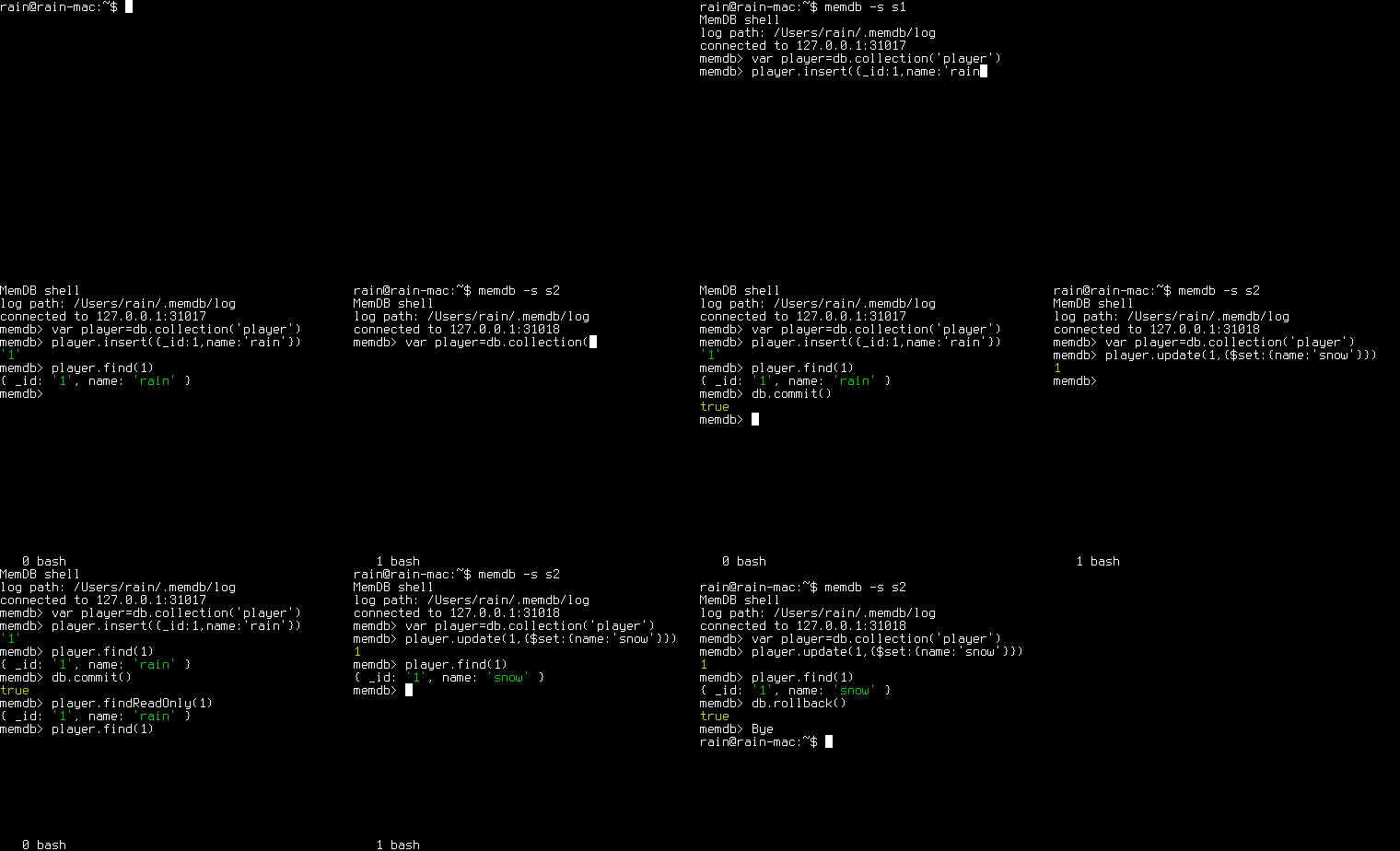
Play with memdb shell
See the video bellow, note how ACID transaction work cross multiple shards.
Mdbgoose
Mdbgoose is a modified Mongoose version that work for memdb
var memdb = require('memdb-client');
var P = memdb.Promise;
var mdbgoose = memdb.goose;

// Define player schema
var playerSchema = new mdbgoose.Schema({
    _id : String,
    name : String,
    areaId : Number,
    deviceType : Number,
    deviceId : String,
    items : [mdbgoose.SchemaTypes.Mixed],
}, {collection : 'player'});
// Define player model
var Player = mdbgoose.model('player', playerSchema);

var main = P.coroutine(function*(){
    // Connect to memdb
    yield mdbgoose.connectAsync({
        shards : { // specify all shards here
            s1 : {host : '127.0.0.1', port: 31017},
            s2 : {host : '127.0.0.1', port: 31018},
        }
    });

    // Make a transaction in s1
    yield mdbgoose.transactionAsync(P.coroutine(function*(){

        var player = new Player({
            _id : 'p1',
            name: 'rain',
            areaId : 1,
            deviceType : 1,
            deviceId : 'id1',
            items : [],
        });

        // insert a player
        yield player.saveAsync();

        // find player by id
        var doc = yield Player.findByIdAsync('p1');
        console.log('%j', doc);

        // find player by areaId, return array of players
        var docs = yield Player.findAsync({areaId : 1});
        console.log('%j', docs);

        // find player by deviceType and deviceId
        player = yield Player.findOneAsync({deviceType : 1, deviceId : 'id1'});

        // update player
        player.areaId = 2;
        yield player.saveAsync();

        // remove the player
        yield player.removeAsync();

    }), 's1');
});

if (require.main === module) {
    main().finally(process.exit);
}
To run the sample above:
- Add the following index config in memdb.conf.js
collections : { player : { indexes : [ { keys : ['areaId'], }, { keys : ['deviceType', 'deviceId'], unique : true, }, ] } } - restart memdb cluster
memdbcluster stop memdbcluster start - Make sure you have started shard 's1' on localhost:31017
- Install npm dependencies
npm install memdb-client - Run with node >= 0.12 (should add --harmony option on node 0.12.x)
node --harmony sample.js
Check here to see how to port your Mongoose project to Mdbgoose
Architecture
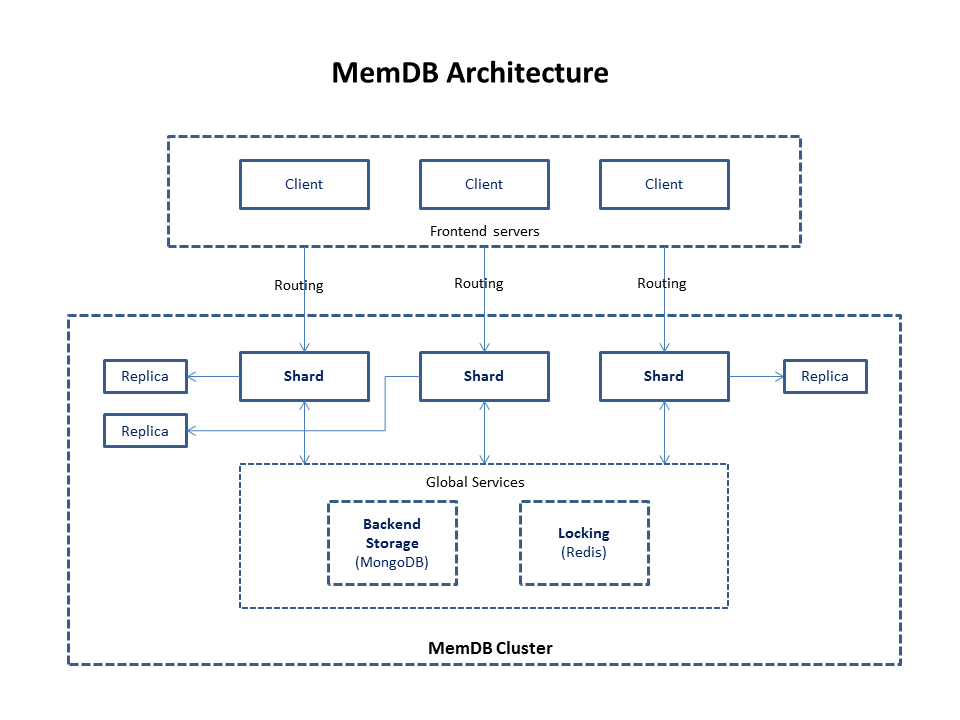
Relationship between MemDB and MongoDB
MemDB is like a 'cache layer' built up on MongoDB which support distributed ACID transaction.
MemDB has its own API which similar to MongoDB, however, you can still use MongoDB's native query API by directly access backend storage, here are the guidelines:
- Do simple query and update through MemDB API, which is ACID transaction safe.
- Do complex query through backend MongoDB, the read is not transaction safe.
- Do complex update through backend MongoDB offline (All MemDB shards are shutdown).
Here are some basic rules for memdb:
- Data is not bind to specified shard, you can access any data from any shard.
- All operations inside a single transaction must be executed on one single shard.
- Access the same data from the same shard if possible, which will maximize performance.
Further read
Quick Pomelo
Quick Pomelo is a Scalable, Transactional and Reliable Game Server Framework based on Pomelo and MemDB
License
Copyright 2015 rain1017.
Licensed under the Apache License, Version 2.0 (the License
);
you may not use this file except in compliance with the License.
You may obtain a copy of the License at
http://www.apache.org/licenses/LICENSE-2.0
Unless required by applicable law or agreed to in writing, software
distributed under the License is distributed on an AS IS
BASIS,
WITHOUT WARRANTIES OR CONDITIONS OF ANY KIND, either express or
implied. See the License for the specific language governing
permissions and limitations under the License. See the AUTHORS file
for names of contributors.
- over 3 years Is there any application example using it?
- almost 4 years Please search answers from Wiki before submit issues here
- Update README.md
v0.5.0 v0.5.0
MemDB become PUBLIC