Are you happy with your logging solution? Would you help us out by taking a 30-second survey? Click here
jazzy
Soulful docs for Swift & Objective-C
 (1 ratings)

Statistics on jazzy
| Number of watchers on Github | 5077 |
| Number of open issues | 158 |
| Average time to close an issue | 13 days |
| Main language | Ruby |
| Average time to merge a PR | 3 days |
| Open pull requests | 32+ |
| Closed pull requests | 28+ |
| Last commit | over 1 year ago |
| Repo Created | over 5 years ago |
| Repo Last Updated | over 1 year ago |
| Size | 59.8 MB |
| Homepage | https://realm.io |
| Organization / Author | realm |
| Latest Release | v0.9.1 |
| Contributors | 17 |
| Page Updated | 2018-03-12 |
| Do you use jazzy? Leave a review! | |
| View open issues (158) | |
| View jazzy activity | |
| View on github | |
| Fresh, new opensource launches 🚀🚀🚀 | |
|
Trendy new open source projects in your inbox!
View examples
|
|

jazzy is a command-line utility that generates documentation for Swift or Objective-C
About
Both Swift and Objective-C projects are supported.
Objective-C support was recently added, so please report any issues you find.
Instead of parsing your source files, jazzy hooks into Clang and
SourceKit to use the AST representation of your code and
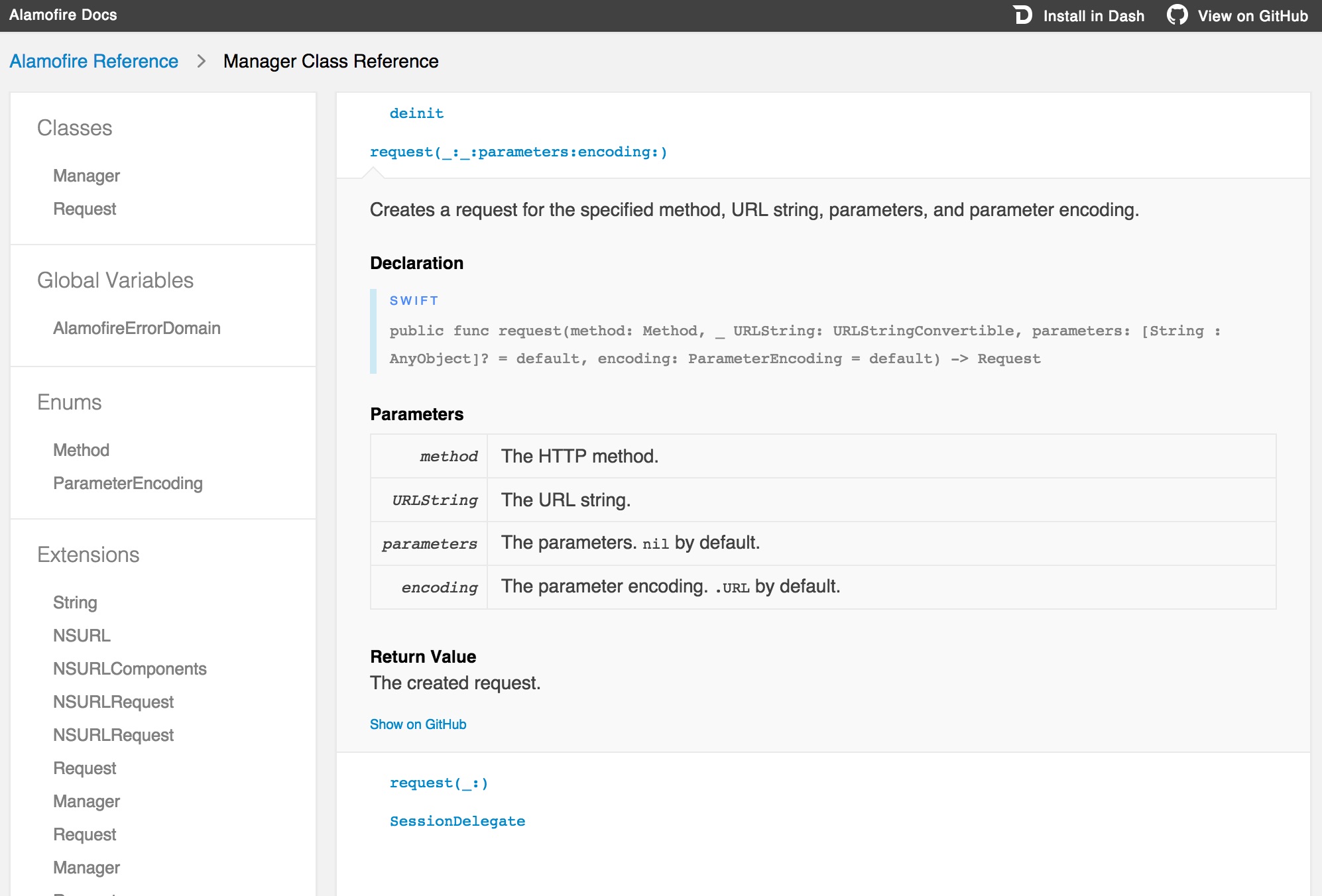
its comments for more accurate results. The output matches the look and feel
of Apples official reference documentation, post WWDC 2014.
This project adheres to the Contributor Covenant Code of Conduct. By participating, you are expected to uphold this code. Please report unacceptable behavior to [email protected].
Requirements
- A version of Xcode capable of building the project you wish to
document. It must be installed in a location indexed by Spotlight for the
--swift-versionconfiguration option to succeed.
Installation
[sudo] gem install jazzy
The Xcode command-line developer tools must be installed to successfully build
the gems that jazzy depends on: try xcode-select --install if you see build
errors.
Usage
Run jazzy from your command line. Run jazzy -h for a list of additional options.
If your Swift module is the first thing to build, and it builds fine when running
xcodebuild without any arguments from the root of your project, then just running
jazzy (without any arguments) from the root of your project should succeed too!
You can set options for your projects documentation in a configuration file,
.jazzy.yaml by default. For a detailed explanation and an exhaustive list of
all available options, run jazzy --help config.
Supported keywords
Swift documentation is written in markdown and supports a number of special keywords. For a complete list and examples, see Erica Sadun's post on Swift header documentation in Xcode 7, her book on Swift Documentation Markup, and the Xcode Markup Formatting Reference.
For Objective-C documentation the same keywords are supported, but note that the format
is slightly different. In Swift you would write - returns:, but in Objective-C you write @return. See Apple's HeaderDoc User Guide for more details. Note: jazzy currently does not support all Objective-C keywords listed in this document, only @param, @return, @warning, @see, and @note.
Jazzy can also generate cross-references within your documentation. A symbol name in backticks generates a link, for example:
- `MyClass` - a link to documentation for
MyClass. - `MyClass.method(param1:)` - a link to documentation for that method.
- `MyClass.method(...)` - shortcut syntax for the same thing.
- `method(...)` - shortcut syntax to link to
methodfrom the documentation of another method or property in the same class. - `[MyClass method1]` - a link to an Objective-C method.
- `-[MyClass method2:param1]` - a link to another Objective-C method.
Swift
Swift documentation is generated by default.
Example
This is how Realm Swift docs are generated:
jazzy \
  --clean \
  --author Realm \
  --author_url https://realm.io \
  --github_url https://github.com/realm/realm-cocoa \
  --github-file-prefix https://github.com/realm/realm-cocoa/tree/v0.96.2 \
  --module-version 0.96.2 \
  --xcodebuild-arguments -scheme,RealmSwift \
  --module RealmSwift \
  --root-url https://realm.io/docs/swift/0.96.2/api/ \
  --output docs/swift_output \
  --theme docs/themes
Objective-C
To generate documentation for Objective-C headers, you must pass the following parameters to jazzy:
--objc--umbrella-header ...--framework-root ...-
--sdk [iphone|watch|appletv][os|simulator]|macosx(optional, default value ofmacosx) -
--hide-declarations [objc|swift](optional, hides the selected language declarations)
Example
This is how Realm Objective-C docs are generated:
jazzy \
  --objc \
  --clean \
  --author Realm \
  --author_url https://realm.io \
  --github_url https://github.com/realm/realm-cocoa \
  --github-file-prefix https://github.com/realm/realm-cocoa/tree/v2.2.0 \
  --module-version 2.2.0 \
  --xcodebuild-arguments --objc,Realm/Realm.h,--,-x,objective-c,-isysroot,$(xcrun --show-sdk-path),-I,$(pwd) \
  --module Realm \
  --root-url https://realm.io/docs/objc/2.2.0/api/ \
  --output docs/objc_output \
  --head "$(cat docs/custom_head.html)"
This is how the AFNetworking docs are generated:
jazzy \
  --objc \
  --author AFNetworking \
  --author_url http://afnetworking.com \
  --github_url https://github.com/AFNetworking/AFNetworking \
  --github-file-prefix https://github.com/AFNetworking/AFNetworking/tree/2.6.2 \
  --module-version 2.6.2 \
  --umbrella-header AFNetworking/AFNetworking.h \
  --framework-root . \
  --module AFNetworking
Themes
Two themes are provided with jazzy: apple (default) and fullwidth.
Here's an example built with apple: https://realm.io/docs/swift/latest/api/
Here's an example built with fullwidth: http://reduxkit.github.io/ReduxKit/
You can specify which theme to use by passing in the --theme option. You can
also provide your own custom theme by passing in the path to your theme
directory.
Guides
| Description | Command |
|---|---|
| Command line option | --documentation={file pattern} |
| Example | --documentation=Docs/*.md |
| jazzy.yaml example | documentation: Docs/*.md |
By default, jazzy looks for one of README.md, README.markdown, README.mdown or README (in that order) in the directory from where it runs to render the index page at the root of the docs output directory.
Using the --documentation option, extra markdown files can be integrated into the generated docs and sidebar navigation.
Any files found matching the file pattern will be parsed and included as a document with the type 'Guide' when generated. If the files are not included using the custom_categories config option, they will be grouped under 'Other Guides' in the sidebar navigation.
There are a few limitations:
- File names must be unique from source files.
- Readme should be specified separately using the
readme_pathoption.
Section description abstracts
| Description | Command |
|---|---|
| Command line option | --abstract={file pattern} |
| Example | --abstract=Docs/Sections/*.md |
| jazzy.yaml example | abstract: Docs/Sections/*.md |
Using the --abstract options, extra markdown can be included after the heading of section overview pages. Think of it as a template include.
The list of files matching the pattern is compared against the list of sections generated and if a match is found, it's contents will be included in that section before listing source output.
Unlike the --documentation option, these files are not included in navigation and if a file does not match a section title, it is not included at all.
This is very helpful when using custom_categories for grouping types and including relevant documentation in those sections.
For an example of a project using both --documentation and --abstract see: http://reswift.github.io/ReSwift/
Controlling what is documented
In Swift mode, Jazzy by default documents only public and open declarations. To
include declarations with a lower access level, set the --min-acl flag to internal,
fileprivate, or private.
In Objective-C mode, Jazzy documents all declarations found in the --umbrella-header
header file and any other header files included by it.
You can then prevent some of these declarations from being documented using --exclude
or :nodoc:.
The --exclude flag lists source files to omit from the documentation. Entries in the
list can be absolute pathnames beginning with / or relative pathnames. Relative
pathnames are interpreted relative to the directory from where you run jazzy or, if the
exclude flag is set in the config file, relative to the directory containing the config
file. Entries in the list can match multiple files using * to match any number of
characters including /. For example:
-
jazzy --exclude=/Users/fred/project/Sources/Secret.swift-- exclude a specific file -
jazzy --exclude=/*/Internal*-- exclude all files with names that begin with Internal and any files under any directory with a name beginning Internal. -
jazzy --exclude=Impl1/*,Impl2/*-- exclude all files under the directories Impl1 and Impl2 found in the current directory.
Declarations with a documentation comment containing :nodoc: are excluded from the
documentation.
Troubleshooting
Swift
Only extensions are listed in the documentation?
Check the --min-acl setting -- see above.
Development
Please review jazzy's contributing guidelines when submitting pull requests.
jazzy is composed of two parts:
- The parser, SourceKitten (written in Swift)
- The site generator (written in ruby)
To build and run jazzy from source:
- Install bundler.
- Run
bundle installfrom the root of this repo. - Run jazzy from source by running
bin/jazzy.
Instructions to build SourceKitten from source can be found at SourceKitten's GitHub repository.
Design Goals
- Generate source code docs matching Apple's official reference documentation
- Support for standard Objective-C and Swift documentation comment syntax
- Leverage modern HTML templating (Mustache)
- Leverage the power and accuracy of the Clang AST and SourceKit
- Support for Dash docsets
- Support Swift and Objective-C (mixed projects are a work in progress)
License
This project is released under the MIT license.
About

Jazzy is maintained and funded by Realm Inc. The names and logos for Realm are trademarks of Realm Inc.
We :heart: open source software! See our other open source projects, read our blog or say hi on twitter (@realm).
- almost 3 years Jazzy Ignores Xcodebuild Arguments.
- almost 3 years Duplicate parameters, returns in docs
- almost 3 years error handling xcodebuild parameters in objc
- almost 3 years Parameter to exclude overridden functions & properties.
- almost 3 years If Xcode is named something else, make command exits.
- almost 3 years ObjC Import file not found when using SPM directory structure
- almost 3 years Module version is not available in templates
- almost 3 years xcodebuild succeeds, but no documentation is generated
- almost 3 years Create docs for Swift from Objective-C for Swift 2.x and 3.x
- almost 3 years Unable to install with install jazzy command
- about 3 years Jazzy 0.7.2 crashes with "comparison of Array with Array failed" ArgumentError
- about 3 years Enums are not documented in my Swift code.
- about 3 years Cannot generate documentation for CocoaPod lib with Swift 3, Xcode 8
- about 3 years Jazzy generated documentation for // TODO: comments
- about 3 years Swift 3.0, Xcode 8: jazzy generates empty docs
- about 3 years Jazzy doesn’t run on XC 8 GM when Swift version explicitly specified
- about 3 years Comma in Xcode Build Arguments is treated as a delimeter
- about 3 years using jazzy when podpsec includes dependencies from a private spec repo
- about 3 years Bug: README: Supported keywords: Objc: Broken link to HeaderDoc user guide
- about 3 years Jazzy can not parse open classes from Swift 3
- about 3 years Jazzy 0.7.0 not compatible with latest XCode8 betas
- about 3 years Jazzy crashes when parsing extension with init
- about 3 years Jazzy overgrabs for headers
- about 3 years Jazzy should ignore properties annotated with NS_UNAVAILABLE
- about 3 years Docs for methods include parameters and returns asides in the abstract, and once again after that
- about 3 years error: use of '@import' when modules are disabled
- about 3 years Doc truncated after "Example:"
- about 3 years Can jazzy generate all files include alamofire,chart and myproject.xcodeproj into one display html?
- about 3 years Jazzy won't parse symbols that have the @available attribute.
- about 3 years List of todos
- Merge ObjC categories into docs of the extended class
- support Objective-C module imports
- Integrated markdown
- Add --skip-documentation option.
- Add --lint-report option.
- Add a Tasks list to the left column.
- Added support for Bitbucket repos - as opposed to gitHub
- Autolink declarations
- Support documenting "substructures" such as Extensions.
- Bump version to 0.6.0
- Add ability to exclude directories in addition to files.
- Integrated markdown parsing and guide support
- update CocoaPods gem to 1.0
- Escape question marks in URLs
- Remove directories before symlinking, fixes installation from Gemfile
- Group operators by name
- Bugfix/bugfix 518
- Fix abstract injection
- Change Dash type for typedefs
- Initial search implementation (fullwidth-only)
- Fixed wildcards in file exclude config
- WIP: Generate badges displaying doc coverage
- Build integration specs with Xcode 8.3.2
- Add -fmodules flag for default objective-c options list
- Fix an issue when additional xcodebuild arguments are ignored in Objective-C mode
- [fix] do not document '//TODO: ' comments
- Add Test Fixtures for Treatment of Undocumented Symbols
- Make --skip-undocumented less aggressive
- Fix space before parameter abstract in output
- Adds a modern Apple docs theme
- Improve Swift declarations using SourceKit's version
- Drop Sass dependency to pre-3.5 to avoid ffi
- jazzy spell check showing correctly spelled words as misspelled
- Cannot install Jazzy Cocoapod
- How to use jazzy to document my swift project?
- Jazzy is not working as expected for generating swift documentation
- Jazzy ViewPager with MVVMCROSS
- refreshable listview using jazzy listview android
- Xcode integration script for jazzy, the doc generator for Swift projects
- Creating Custom Dictionary in Jazzy - java Spell Checker API
- Jazzy GridView is not responding on click event
- EPub Spell Checker using Jazzy (Word with wrong spelling doesn't appear in JTable) - Closed
- How to use efficiently Jazzy ViewPager
- C# Application with Jazzy UI
- Aspel dictionaries for Jazzy libraires in Java
- Java web framework with Jazzy UI
v0.9.1 0.9.1
Breaking
- None.
Enhancements
Added a config option (
--undocumented-text UNDOCUMENTED_TEXT) to set the default text for undocumented symbols.
Akhil Batra #913Added a config option to hide Objective-C or Swift declarations:
--hide-declarations [objc|swift].
Ibrahim Ulukaya #828Automatically use Swift or Objective-C syntax highlighting for code blocks in documentation comments. Improve Swift highlighting with latest Rouge.
John Fairhurst #218
Bug Fixes
Fix Swift declarations when generating Objective-C docs for generic types.
John Fairhurst #910Don't create documentation nodes for generic type parameters.
John Fairhurst #878
v0.9.0 0.9.0
Breaking
- Generate documentation coverage badge locally. Since this avoids the failable
HTTP request to shields.io previously used to obtain the badge, we've removed
the
--[no-]download-badgeflag and the correspondingdownload_badgeYAML configuration key.
Samuel Giddins
Enhancements
- None.
Bug Fixes
Fixed issue that prevented Jazzy from running on case sensitive file systems.
Jeremy David Giesbrecht #891Fixed issue preventing
--podspecfrom working withtest_specs.
John Fairhurst #894Always display correct declaration for undocumented symbols.
John Fairhurst #864Trim common indentation in multiline declarations.
John Fairhurst #836
v0.8.4 0.8.4
Breaking
- None.
Enhancements
Align jazzy terminology with Apple usage.
Xiaodi Wu John FairhurstAdd
urlattribute that can be more accurate than{{section}}.htmlas a URL in custom templates.
John Fairhurst
Bug Fixes
Fix crash when specifying
swift_versionas a floating point value in.jazzy.yamlrather than a string.
JP Simard #860Autolink from parameter documentation and from external markdown documents including README. Autolink to symbols containing & < >.
John Fairhurst #715 #789 #805Fix Swift 4 declarations containing ampersands (
&) being truncated.
JP Simard