Are you happy with your logging solution? Would you help us out by taking a 30-second survey? Click here

Statistics on SwiftGoo
| Number of watchers on Github | 35 |
| Number of open issues | 0 |
| Main language | Swift |
| Open pull requests | 0+ |
| Closed pull requests | 0+ |
| Last commit | over 3 years ago |
| Repo Created | over 3 years ago |
| Repo Last Updated | about 2 years ago |
| Size | 696 KB |
| Organization / Author | flexmonkey |
| Contributors | 1 |
| Page Updated | 2018-03-11 |
| Do you use SwiftGoo? Leave a review! | |
| View SwiftGoo activity | |
| View on github | |
| Fresh, new opensource launches 🚀🚀🚀 | |
|
Trendy new open source projects in your inbox!
View examples
|
|
Evaluating SwiftGoo for your project?
Score Explanation
Commits Score (?)
Issues & PR Score (?)
SwiftGoo
Kai's Power Tools Goo - written in Swift!
Companion project to Recreating Kai's Power Tools Goo in Swift
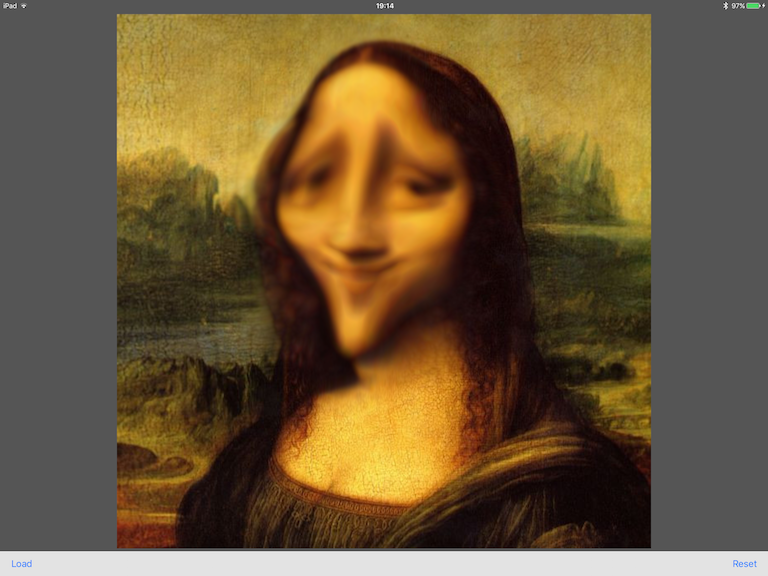
If you remember Kai's Power Tools from the '90s, here's a quick and dirty version of Goo for iPad and iPhone. It uses a simple warp kernel to move pixels around based on the direction of the user's touch.
If you have an iPhone 6s or an Apple Pencil, it also considers touch pressure.
To do: the radius of the effect is hard coded and should consider the size of the image. If you load a large image, the relatively small effect radius isn't quite right. The default Mona Lisa image 640*640 works great :)
SwiftGoo list of languages used